
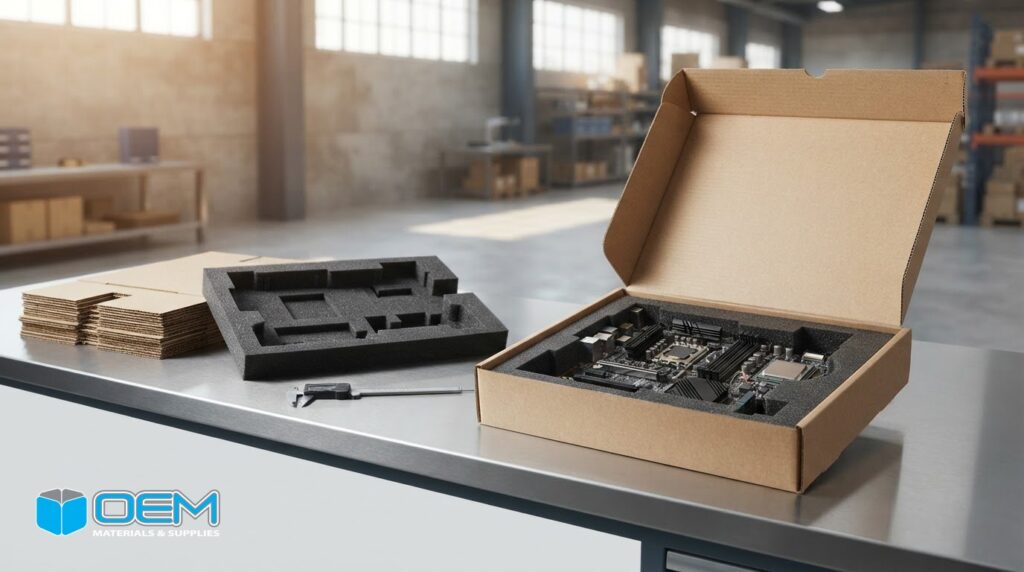
A foam insert can fit inside a box and still fail to protect the hardware. If a component shifts during handling, or the material doesn’t suit its shape and static-sensitivity requirements, damage can disrupt fulfillment and operations. Choosing protective foam for computer hardware means matching the insert to the product and the conditions it will face in storage and transit.
Cushioning alone isn’t enough. Foam needs to support the hardware, limit unwanted movement, and work with the outer box and packing process. Buyers also need to consider packing labor, material use, and consistent results across repeat shipments.
This guide covers the protection requirements to assess, compares foam formats and design approaches, and outlines the project details that help shape a practical solution. You’ll see how hardware dimensions, shipping risks, and operational needs affect foam selection, and what information to bring to a packaging design discussion.
Key Takeaways
- Match protective foam for computer hardware to the component’s shape, sensitivity, and likely handling and shipping risks.
- Document the product, risks, outer package, and packing method before choosing foam. Thickness and density describe different properties.
- Compare loose or sheet foam, expanding foam packaging, and engineered inserts based on fit, packing consistency, storage, and shipment frequency.
- Review prototype fit, operator packing steps, and box closure before scaling a packaging design.
- Bring product dimensions, weight, shipping conditions, and usage needs to a design discussion to help develop a practical packaging solution.
Why Computer Hardware Needs a Fit-Based Foam Protection Plan
Protective foam packaging cushions a product and limits its movement during handling and transit. For computer hardware, the goal isn’t simply to fill empty space. Foam should support appropriate areas of the equipment while keeping pressure off vulnerable features. The right protective foam for computer hardware depends on the product, package configuration, and shipping requirements.
Different conditions can cause damage. An impact may load a corner or panel; vibration can create repeated contact between a component and its packaging. Abrasion can mark a finished surface, while excess clearance lets equipment shift. Transfers, storage, and other handling steps create additional opportunities for movement or contact. A fit-based plan identifies which risks matter for the shipment and workflow.
Hardware shape determines where support is needed. A desktop tower may need stable support around its base and sides. A monitor needs protection around its display and frame without pressure on the screen. A keyboard or docking station has its own contours and protrusions, while an internal board or small component may need controlled positioning around delicate areas. Foam formats and material properties vary, as outlined in Foam: Properties, Types, and Applications.
- Impact: Consider where a drop or collision could load the package and transfer force to the product.
- Vibration: Check whether equipment could repeatedly contact the insert or outer box in transit.
- Abrasion: Identify finished surfaces that could rub against packaging or adjacent parts.
- Movement: Look for gaps that could let hardware shift, tilt, or rotate.
- Repeated handling: Account for transfers, unpacking, storage, and repacking where applicable.
Which computer hardware characteristics affect foam design?
Start with dimensions and weight, then record the product’s shape, protrusions, and fragile areas. A projecting connector, ventilation feature, or uneven housing can affect how the product sits in the package. Identify which faces can support the equipment and which surfaces or components must stay clear of packaging pressure. Also note whether equipment ships assembled or as separate parts, since each configuration has different contact points and restraint needs.
How do shipping and handling conditions change the requirement?
Map the route, transfers, storage conditions, handling frequency, and expected package orientation. A parcel moving through multiple handling stages may face different demands from a controlled internal transfer between nearby work areas. Those conditions affect how firmly the product needs to be held and where cushioning is useful. Avoid assigning a universal protection level without shipment-specific evidence. Assess the complete package and process.
For operations in Orange County, the packaging plan should reflect how equipment moves from packing through delivery or internal use. OEM Materials & Supplies designs custom foam packaging as part of a system with the corrugated box and packing method, rather than treating the insert as a standalone component. This fit-based assessment gives purchasing and operations teams a practical starting point for selecting and evaluating a solution.
How to Specify Foam Protection for a Computer or Component
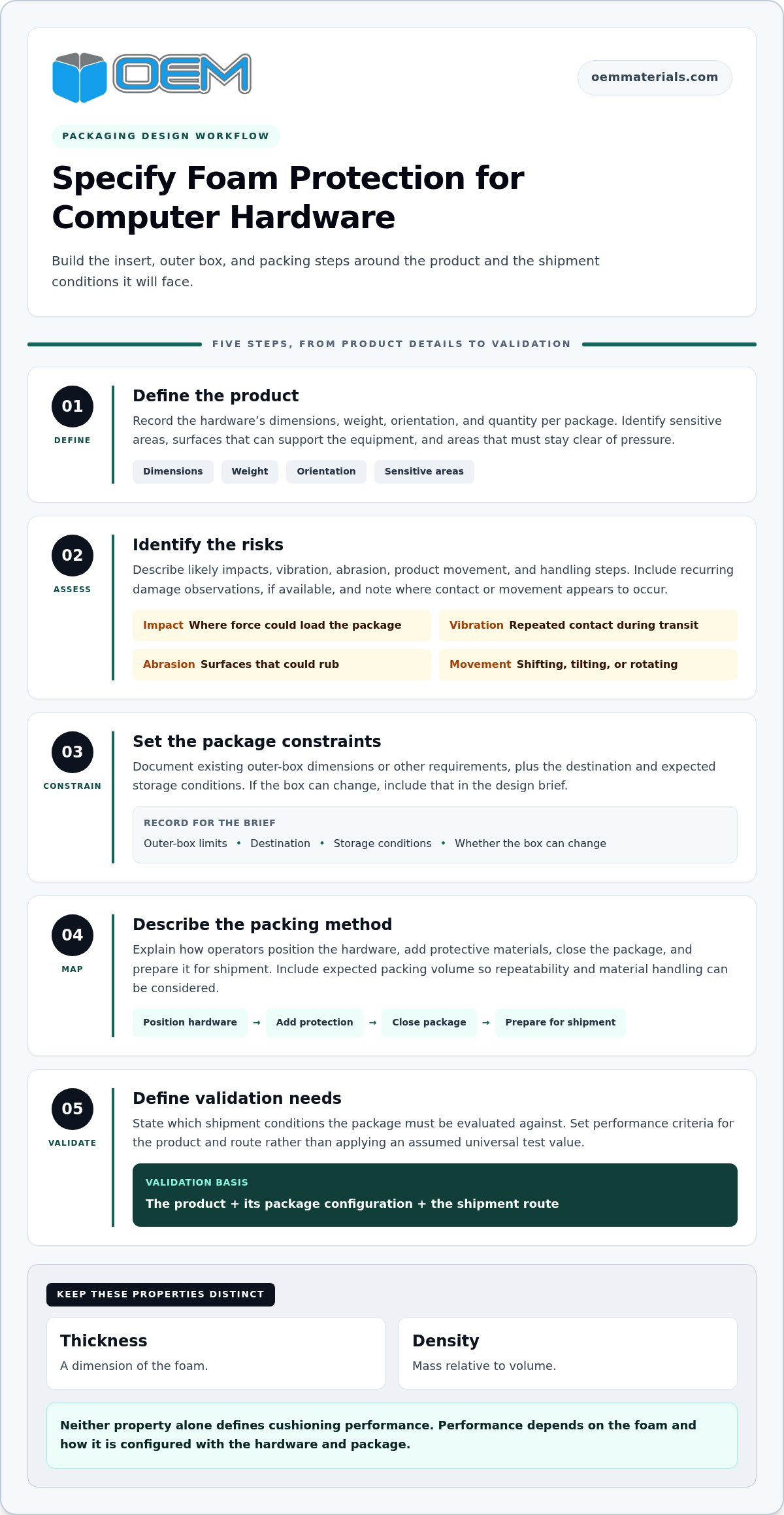
A useful foam specification starts with the hardware and shipping process, not a preferred foam format. Document requirements in sequence so the insert, outer box, and packing steps work as one package. This gives the packaging design team a clear basis for developing a sample and reviewing it before production.
- Define the product. Record dimensions, weight, orientation, quantity per package, and sensitive areas. Note which surfaces can support the equipment and which must remain clear of pressure.
- Identify the risks. Describe likely impacts, vibration, abrasion, movement, and handling steps. Include recurring damage observations, if available, and note where contact or movement appears to occur.
- Set the package constraints. Document existing outer-box dimensions or other requirements, along with the destination and expected storage conditions. If the box can change, include that in the brief.
- Describe the packing method. Explain how operators position the hardware, add protective materials, close the package, and prepare it for shipment. Include expected packing volume so repeatability and material handling can be considered.
- Define validation needs. State which shipment conditions the package must be evaluated against. Set performance criteria for the product and route instead of applying an assumed universal test value.
Keep the terms distinct. Thickness describes a foam dimension, while density describes mass relative to volume. Neither property alone defines cushioning performance. Performance depends on the foam and how it is configured with the hardware and package. A thicker insert isn’t automatically a better fit, and density alone doesn’t show how a complete package will perform. Set technical criteria for the project rather than assuming a value or standard that hasn’t been specified.
What information should a hardware packaging brief include?
Along with product details, note destinations, handling steps, storage conditions, packing volume, outer-box limits, and current instructions. A broader reference such as Industrial Guide to Foam Inserts: Engineering and Material Selection can help frame material and insert considerations. For general engineering and standards context, the National Institute of Standards and Technology (NIST) provides public resources. Project-specific packaging criteria still need to be defined for the application.
How should foam fit and cushioning be assessed?
Check whether the support points hold the equipment in position while leaving controlled clearance around vulnerable areas. A sample or prototype lets the team assess fit, placement, removal, and the packing sequence with the actual product. Evaluate the complete package, including its outer box, under conditions relevant to the shipment before scaling. OEM Materials & Supplies provides custom packaging design support to coordinate foam fit with box design.
For a project discussion, share product dimensions, weight, package quantity, shipping destinations, and expected usage through the quote request form. These details help define a practical starting point for protective foam for computer hardware.
Compare Foam Formats for Computer Hardware Shipments
Foam format affects how equipment is supported and how consistently a package can be prepared. Loose or sheet foam, expanding foam packaging, and engineered inserts each have different implications for fit, packing steps, storage, and repeat shipments. Choose based on the hardware and workflow, not a product description alone.
Loose or sheet foam
Fit: Can be cut, layered, or positioned around products, but the result depends on how the material is arranged. Packing consistency: May vary if operators use different amounts or placement. Handling and storage: Requires shaping at the workstation, with sheets or pieces kept available. Recurring shipments: Can work for varied products or lower-volume needs when the packing method is clear and repeatable.
Expanding foam packaging
Fit: Can adapt around varied shapes, depending on the packaging process and product configuration. Packing consistency: Relies on repeatable placement and use. Handling and storage: Requires a defined process for preparing and positioning the foam. Recurring shipments: May suit less standardized packing, but assess the complete package and workflow before adopting it for routine use.
Engineered foam inserts
Fit: Shaped for a defined product configuration and intended contact points. Packing consistency: Can help standardize product placement. Handling and storage: The insert needs to be stored and presented for the packing sequence. Recurring shipments: Worth evaluating for repeat shipments of the same hardware configuration when consistent placement is an operational priority.
These formats involve tradeoffs, not a universal ranking. Compare packing steps, available storage space, product variation, and shipment frequency alongside fit. For broader engineering and materials research, NASA provides an extensive public resource, but the appropriate packaging choice must be assessed for the specific hardware and shipment.
When can flexible or expanding formats be considered?
Adaptable cushioning may be useful when product shapes vary or packing isn’t fully standardized. It still requires a controlled method: operators should position the hardware consistently and confirm it stays stable inside the package. A marketplace description that calls a format suitable for computers doesn’t establish that it fits every device, configuration, or shipment. Assess fit and workflow with the actual product.
When does an engineered foam insert make more sense?
A shaped insert can establish consistent support points for a defined product and guide placement during packing. That may suit recurring shipments, while flexible formats can accommodate more variation but require more operator adjustment. Consider custom foam packaging alongside the outer package. A corrugated box and its cushioning function as one system, so box dimensions, closure, and packing sequence matter. Coordinated foam-and-box development keeps these decisions connected.
When evaluating protective foam for computer hardware, review the full package: insert, corrugated box, and operator steps. An insert that fits the equipment but complicates packing or leaves it free to move may not suit the operation.
Validate the Foam, Outer Box, and Packing Workflow Before Scaling
Evaluate a foam sample as part of the complete package, not as a standalone material. Before approving a larger run, confirm that the hardware stays positioned, operators can pack it consistently, and the outer box closes as intended. The review should reflect the actual product configuration and shipping process.
- Check prototype fit. Place the equipment in the insert and inspect contact points, clearances, and vulnerable surfaces.
- Review the packing sequence. Have intended operators pack and remove the product using the proposed instructions and materials.
- Inspect the closed package. Confirm the foam and hardware fit within the corrugated box and that closure doesn’t interfere with the package design.
- Evaluate shipment conditions. Review the complete package under handling conditions relevant to its route and use the findings to guide revisions.
- Document changes. Record adjustments to the insert, box, materials, or work instructions before approving a larger production run.
What should a prototype or sample review examine?
Look for unwanted movement, pressure on surfaces that should remain clear, and contact between the hardware and the box. Check whether the product can be removed and repacked without disrupting the intended support points. Observe the packing steps with the people who will perform them. Note placement ambiguity, extra handling, or fit issues, then capture required revisions before sign-off.
Include the outer box and any other required cushioning or protective materials in the evaluation. An insert that appears to fit on a workbench may behave differently when combined with the box and packing sequence. Check that the package closes correctly and that each material has a clear role. The goal is to review the complete packaging system under relevant conditions, not to assume a sample proves performance in every shipment.
How can teams plan for repeatable packaging supply?
Compare the needs of prototype builds, short runs, and high-volume programs before finalizing a design. A process that works for a small pilot may need clearer instructions or component staging as packing volume increases. If foam, boxes, and related materials need to arrive together as a prepared set, kitting or assembly can help organize the workflow. Revisit the packaging plan when product configurations or shipping requirements change.
OEM Materials & Supplies serves manufacturers in Orange County, Los Angeles County, the Inland Empire, including Riverside, and San Diego County. Its custom packaging design support coordinates engineered foam inserts with corrugated boxes and packing requirements. Share dimensions, product weight, package quantity, shipping destinations, annual usage, and any observed damage patterns to define the project. To discuss protective foam for computer hardware, submit your packaging project details.
Build a Computer Hardware Foam Packaging Solution Around Your Operation
Protective foam for computer hardware works best when designed as part of a packaging system, not selected as an isolated item. OEM Materials & Supplies develops custom packaging solutions that bring engineered foam inserts, corrugated boxes, and packing requirements together. The aim is a practical fit for the equipment and the way your team handles, stores, and ships it.
Project needs vary by production stage. A prototype may call for a sample to assess fit and workflow. A short run may need a repeatable packing approach, while a high-volume program may require consistent materials and defined assembly steps. Packaging design, prototyping, kitting, and assembly can support these needs when they fit the project. The appropriate scope depends on the product configuration and shipping requirements.
What can a packaging project include?
A coordinated solution may include an engineered foam insert and an outer corrugated box designed around the same hardware configuration. The box provides the outer package, while the insert positions and cushions the product within it. Reviewing them together helps align interior fit, closure, and operator packing steps. For projects where the outer package is part of the design, corrugated box solutions can be considered alongside the foam.
The workflow matters too. If operators need the box, insert, and other packaging components staged together, kitting or assembly can help prepare the set for packing. Design support connects insert geometry with the outer package and the way the hardware enters and leaves it. These decisions should reflect the actual packing environment, without adding steps that don’t serve the operation.
What information helps start a useful quote discussion?
A focused project brief gives the packaging team a stronger starting point than a request for foam alone. Include the product configuration and shipment context, then describe operational constraints that could affect fit, handling, or repeatability. If you have a current package or sample, its dimensions and any observed issues can help clarify the design goals.
- Product dimensions, weight, and assembled or component configuration
- Quantity per package, shipment destinations, and shipping or handling conditions
- Annual usage and whether the need is for a prototype, short run, or ongoing program
- Current damage concerns, packing steps, and outer-package dimensions or constraints
OEM Materials & Supplies supports packaging projects for manufacturers in Orange County, Los Angeles, Riverside, and San Diego, as well as nationwide. Share the product and workflow details that shape your requirements to discuss an approach suited to the project.
Request a packaging quote with your dimensions, weight, annual usage, and shipping context.
Put Your Packaging Requirements Into Motion
Once a package is approved, make the design part of the operating standard. Keep the agreed packing sequence and configuration accessible to the people preparing shipments, and review them if the hardware or fulfillment process changes. That keeps packaging decisions connected to day-to-day execution.
A clear standard also gives purchasing, engineering, and warehouse teams a shared reference for protective foam for computer hardware as the program develops.
Request a packaging quote to discuss your project. Include product dimensions, weight, annual usage, and shipping context to help start a focused conversation.
Frequently Asked Questions
Is foam packaging suitable for every type of computer hardware?
No. A foam format isn’t automatically suitable for every device, and a sample alone doesn’t validate the complete package. Account for configuration changes as well as the hardware itself. For example, note whether a shipment includes a power supply, cables, or other accessories, and whether those items ship in the same package. If a product revision changes what’s included, review the packing instructions so the pack-out still matches the contents.
What type of foam is best for shipping a computer?
There isn’t one best format for every computer shipment. If a product family includes several configurations, decide whether each needs a dedicated package or whether a shared design can accommodate the variations without confusing packers. This decision guides format selection more effectively than choosing by material name alone. Document the approved configuration for each package so purchasing and warehouse teams work from the same requirements.
Can expanding foam be used to pack computer hardware?
It can be considered, but the method should be evaluated for the specific pack-out. For a computer shipment that includes accessories, define which pieces are included and how each should be placed. Changes to package contents can affect the packing arrangement, so don’t treat one setup as suitable for every order. Clear instructions for each configuration help operators prepare packages consistently.
How do I keep a computer from moving inside its shipping box?
Specify how the computer should be oriented and seated during packing, then make that position easy for operators to recognize. A placement diagram or marked orientation in the packing instructions can reduce uncertainty, especially when more than one side of the device could face up. Keep the method consistent across shifts, and review it if operators report difficulty positioning the computer or closing the package.
Does computer hardware need anti-static foam for shipping?
That depends on the equipment’s electrostatic discharge requirements. Mechanical cushioning and static control address different packaging needs, so identify the hardware’s handling classification through your engineering or product documentation. Include that requirement in the packaging brief and evaluate materials as part of the complete system. Don’t assume foam selected to cushion a product also provides any static-control properties the shipment requires.
What information should I provide for a custom computer hardware foam quote?
Include dimensions, weight, configuration, annual usage, and shipping context, then clarify how many product variants are involved. For multiple versions, identify each variant and note its included accessories. Drawings, photographs, or an existing package can help explain unusual features or constraints. State whether annual usage is a combined estimate or applies separately to each configuration. Cost and material use depend on product dimensions, materials, and shipping requirements.